Inside AdMob
Google’s official blog for news, tips, and information on the AdMob developer platform
New AdMob tools help you build a smarter, faster mobile app business
May 28, 2015
There are many different ways for developers to make money from mobile apps. Paid downloads have been a popular choice among developers, but with only a third of users willing to pay
1
,
increasingly apps are free Now, more and more developers are making money with
in-app advertising and freemium models, with revenue for both growing over 70% from 2013 to 2014.
2
That’s why today, at our annual I/O conference, we announced a set of tools to help you create smarter ways to monetize through segmentation, scale your business through reservations and integrate rich ad formats into apps more easily.
Smarter tools for greater success
As a developer, you want to know your most valuable users and be able to create different experiences for them in your app. Recently we launched the
Audience Builder tool
, powered by Google Analytics, that enables you to segment users based on how they are using your app. Now we’re announcing a new smart feature in beta, that enables you to
define a list of users and show ads to them, while hiding ads from the rest of your users. For example, you might show ads to casual users, but hide ads from highly-engaged users who love sharing your app with their friends on social networks. If you’d like to be considered for this beta, please sign up
here
.
Targeting ads to an audience in AdMob
Smarter monetization should mean earning the most revenue possible, and AdMob’s free
mediation tool
has helped many developers run other mobile ad networks through the AdMob platform to simplify management and improve competition. Today we announced that AdMob mediation now supports
40 mediation partners
, with 15 networks added in the past year alone. We're pleased to welcome
Tencent GDT
as our newest mediation partner, one of the largest mobile ad networks in China.
Helping you scale your app faster
Many app businesses with global reach and scale are growing very quickly in the ecosystem. These apps have dedicated sales teams who work with large advertisers to sell their inventory. Today, we announced a beta to support mobile app sales teams called AdMob Reservations. These sales teams will be able to take ad campaign bookings from advertisers they work with directly, upload ad creatives, and manage the delivery of these campaigns for free, using the AdMob platform.
Fast-growing app developers are choosing AdMob to monetize. Last week, Etermax, who created one of the world’s most popular trivia games in
Trivia Crack
, became one of our
newest partners
.
Making ad integration easier
We want to bring
native ads
to more app developers in a scalable way and with minimum fuss, so we’re improving our ability to serve these types of ads. In the coming months, we’ll be introducing Native Ads Express, a new way to take advantage of native ads that requires no custom engineering work by you.
We know there are many developers who don’t have the resource to design a custom native ad that matches their app, but still want the flexibility that native ads offer. With this feature you can simply define the style of your ad using CSS, and AdMob serves the ad adhering to your specs. You can update the ad’s appearance on the fly by adjusting the CSS, so there’s no need to change your app’s native code when you want to test a different look. We have ads from millions of advertisers that can be styled in the way you want.
We’ve already made great strides to help you integrate AdMob ads across platforms with plugins for games engines such as
Unity
and
Cocos2d-x
. Now, we’re excited to announce the integration of AdMob into
Android Studio
. This powerful new feature will let you quickly and easily create AdMob ad units as you build your app.
AdMob Ads Activity in Android Studio
At Google, we’re passionate about fostering successful app developers, and as the AdMob platform continues to grow, with over 650,000 apps, we’re continually working to give you the tools you need to build your app business, intelligently. Visit
the AdMob website
to get started, and put our new monetization tools to work in your apps.
Lastly, if you’re interested in driving app installs and measuring campaign performance, see the latest exciting I/O announcements from our
AdWords
and
Google Analytics
teams.
Posted by Jonathan Alferness,
Vice President, Product Management
______
1.
eMarketer, February 2015
2. App Annie, App Annie & IDC Mobile App Advertising and Monetization Trends, March 2015
Almost time to share your feedback on AdMob
May 22, 2015
To improve our product and service, we send out a survey to our developers every 6 months. The next survey will be released over the coming weeks and we’re looking forward to getting your responses.
Thanks to your suggestions from our last survey, we’ve launched new features to improve our product and help you grow your earnings. These include launching in-app purchase house ad formats, allowing developers to create audience lists for re-marketing, introducing TrueView video ad interstitials and native ad formats.
Provided we have the right email address for you and you’ve opted in to ‘occasional surveys’, you could get an email giving you access to complete the full survey. Please double check that:
You’ve
updated
your contact details
You’ve
opted into
receive ‘occasional survey’ messages
Whether you’ve completed this survey before or you’re providing feedback for the first time, we’d like to thank you for sharing your valuable thoughts.
We’re excited to get your feedback!
Posted by
Rachel Barrett
AdMob Developer Happiness Team
Register to see Jonathan Alferness' app monetization livestream at Google I/O 2015
May 14, 2015
Google I/0 2015 is just around the corner (May 28-29th), and we’ll be there. There’ll be more than 200 talks centered around some important topics which matter to you:
Design & Develop
, to help you build beautiful, powerful apps;
Earn & Engage
, where we’ll cover tools to grow your user base and create sustainable, successful businesses; and
What’s Next
, a peek into Google’s emerging platforms.
Be sure to tune into our session featuring Jonathan Alferness, VP of Product Management and Global Head of Mobile Display Ads Products for Google on Thursday, May 28, 2015 at 2pm PDT . He’ll be discussing how AdMob brings the power, scale and innovation to app developers who want to monetize effectively through tools like ad mediation for higher fill rates, new formats like native ads, and Audience builder with Google Analytics for list building and targeting. In this talk, we will also be unveiling some new features that will help make things simpler for developers.
Click here to register for the livestream
.
Posted by the Google AdMob Team
Refer a friend and be eligible to win
May 4, 2015
Great developers know other great developers. Starting today, you can refer developers to sign up for AdMob through our AdMob Referral Program. Both you and your eligible referral* will have the opportunity to win a trip to Google Headquarters to meet the AdMob team.
Registering for the program is simple. Just fill out our
referral form
by June 30, 2015 to invite your friend. Both you and your eligible referral will be eligible to win a round-trip flight to Google Headquarters to meet the AdMob team, an opportunity for your app to be features in the AdMob App Spotlight video series, a Nexus 6, and more!
Ready to refer? Submission deadline is June 30, 2015. Multiple referrals are welcome. Send any questions to
admobreferrals@google.com
.
Posted by the Google AdMob Team
*Qualified developer referrals exclude existing AdMob developers. For more details, review the full terms and conditions for the
AdMob Referral Program
and the
Referral Program Contest
, including additional details about eligibility.
Shoot for the stars: 6 principles to optimize app quality
April 30, 2015
As an app developer, you know that improving your app’s rating to 4 stars or more could increase discoverability and convince more users to download it.
Google Play research
also shows that higher rated apps earn more revenue:
* Revenue includes all app business model on Play: IAP, paid app, ads advertising
But how can you achieve that 4+ star score? Once you have set up your regular cycle of collecting, reviewing and actioning feedback from user reviews and ratings, the next key strategy is to optimize the quality of your app.
6 principles to improve app quality
1. Stability: no crashes.
Read user error reports often, and take action quickly to help you improve stability and eliminate bugs.
2. Responsiveness: speed matters.
Minimizing the complexity of your layouts is a simple way to improve your app speed.
3. Usability: be thumb friendly.
Two common, easy-to-fix problems are addressing small tap targets and fonts that are too small. Make sure links are easy to tap.
4. Appearance and aesthetics.
If you don't have the luxury to work with a designer, try using Photoshop, GIMP and other image editing tools to make your app look better.
5. Less is more: launch the right features.
Listen to your users by collecting and responding to feature requests, but remember, you don’t always need to build every suggestion.
6. Integrate with the system and third-party apps:
make users happy by including system features like
Home screen widgets
,
rich notifications
,
global search integration
, and
Quick Contacts
; or leveraging other apps’ functionality.
Until next time, be sure to stay connected on all things AdMob by following our
Google+
page and
Twitter
page.
Posted by Amelia Walkley
Marketing Communications Specialist, AdMob
3 steps to earn higher user ratings
April 20, 2015
Need to raise your app’s ratings and increase downloads? Gimmicks and hacks to get higher ratings and more reviews won’t get your app meaningful long-term growth. Instead, the best way to get better ratings is to build authentic relationships with your users–truly listening and responding to their feedback. This leads to a better product experience, loyal users, and ultimately sustainable growth.
Here are three steps to use reviews and ratings to improve your app and increase user engagement.
Step 1: Read and address ratings comments
Book an hour in your calendar each week to read through ratings comments.
Reply to user reviews to help address their concern or gather more detailed feedback.
Pay extra attention to those who gave you 1 or 2-star ratings as their comments will give you more insights for improvement.
Step 2: Create user friendly opportunities to collect feedback
To make sure you’re getting feedback from the most appropriate users, define the signals that prompt your target audience like “reached Level 10”, “completed the first booking”, or “opened 3+ times in a week”
Choose a placement in your app where you don’t interrupt user experience. Unexpected pop-up messages asking for a rating can bother users. Instead, place the review request after a user has had a positive interaction with your app, like successfully completing a task or level.
Ask about the user’s happiness level first. Depending on their happiness level, provide different channels to escalate their feedback:
Step 3: Analyze and act on user feedback
Apply filters to see feedback by rating, written language, app version, and/or device.
Understand your user better by interpreting comments against user-related metrics such as download sources, retention rates, and in-app behavior.
Update your app with users’ feature requests and fix issues they have raised. Be sure to respond to the comment directly in the Play Store, sharing the positive changes you’ve made.
The hard work of building relationships and responding to user’s concern won’t pay off instantly, but it can lead to longer term success. Until next time, be sure to stay connected on all things AdMob by following our
Google+
page.
Posted by Amelia Walkley
Marketing Communications Specialist, AdMob
Lowdown: Best ways to monetize your messaging app
April 13, 2015
Lowdown is a regular series that brings you tips and tricks on how to best use AdMob to grow your app business, directly from members of the Google AdMob team.
It’s a fantastic time for messaging apps. Massive company valuations, global user bases, and strong demand for wifi-based communication have incentivized mobile developers to throw their hats into the messaging arena. We’ve seen the features and functionality for these apps become more sophisticated, expanding to delivering virtual goods, coupons, app-discovery, and even social networking. As functionality has expanded, so have the monetization potentials. Here are a few ways to best monetize your messaging app and tips to optimize your setup.
Banner Ads:
The nature of messaging apps make it very conducive for banner ad units. User spend large quantities of time on their menu, contacts and messaging pages, making it easier for users to interact with ads and drive higher engagement from anchored banner units. AdMob’s strong global coverage and year over year eCPM growth in this format can help monetize the market your users operate within.
Interstitials Ads:
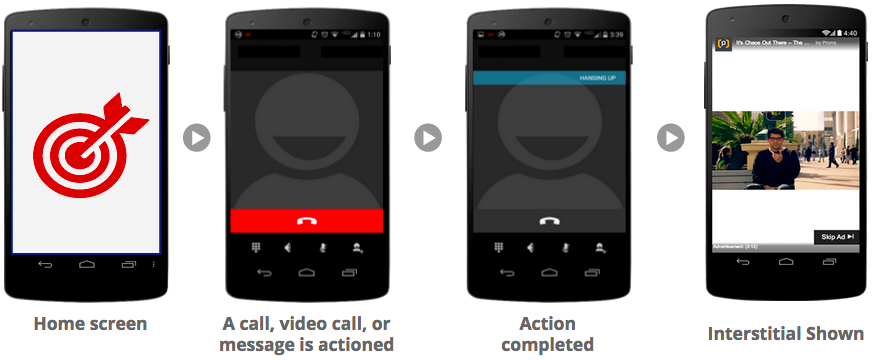
Interstitial ads are not just for gaming apps. Messaging apps also have natural transition points within their user’s flow, perfect for eCPM-driven ad units like interstitials. For example a perfect place for an interstitial ad may be the moment once a user completes a phone or video call and the app transitions back into the main screen. See examples below.
Targeted In-App Purchases
Messaging apps could offer In-App Purchases (IAPs) in the form of more minutes, credits or virtual goods. Although the traditional conversion rates for these offers have been very low, AdMob automatically figures out which of your users are likely to spend, based on Google’s proprietary data and models. AdMob offers robust IAP functionality, making it easy for you to create IAP offer units and target high potential spenders. You can learn more about this feature
here
.
A diversified, metrics driven approach can help you to better monetize your messaging app. Visit our
website
to learn more about how AdMob can help you grow your app business. Until next time, be sure to stay connected on all things AdMob by following our
Google+
page.
Posted by Jeff Salvitti
Strategic Mobile Partner Manager
How FGL helped indie game developers increase their revenue by 50%
April 7, 2015
Adam Schroeder
Co-Founder, FGL
FGL
is not your average app company. They don’t build apps themselves, instead they help independent game developers grow their business and generate more revenue. So far, they’ve earned over $20M in revenue, guiding over 30,000 registered developers from 105 countries around the world. Using AdMob well is one of the secrets to their success. We recently got to discuss their business with co-founder Adam Schroeder. To check out
FGL’s success story
, or any other of our other success stories, visit us at
http://www.google.com/admob/success.html
. Until next time, be sure to stay connected on all things AdMob by following our
Google+
page.
Posted by
Desiree Motamedi
Product Marketing, AdMob
Our AdMob Support Team is Here for You!
March 19, 2015
We get it - it’s not easy being an app developer. From being inspired to create an app to the final moment of pushing it live to the app store, there are already plenty of challenges for you to overcome. That’s why our global AdMob support team is here to make monetizing your apps with AdMob as breezy as possible.
Over the past year, we’ve worked tirelessly to create and improve content on the
AdMob Help Center
so that you can easily find answers to your questions. However, we also understand that sometimes you just want to communicate with a real person.
That’s why beginning of this year we launched a new
Contact Us
flow. Anyone with an AdMob account that’s making more than $25 a week can reach us for assistance via the Help Center. Simply click on the “Contact Us” button (upper right hand corner). This applies to
AdSense
too. If you don’t qualify and can’t find that “Contact Us” button, don’t worry! You can still reach us via the issue-based troubleshooters found throughout our Help Center.
To give you a better idea of what we do, here are a few common questions we get:
When am I getting paid?
What happens to my AdMob account if I’m moving to another country?
Why was there a difference between my estimated earnings and my finalized earnings last month?
Of course, that’s not all. We support up to 650k apps across
35 different languages
via our email support, and we make it our top priority to answer your questions as quickly as we can. Our average response time is less than 1 business day, and last month, we achieved an 80% survey satisfaction rate through our support interactions with developers!
Here are a few more resources to help make your life easier!
AdMob Quick Guide
Help Center troubleshooters
Help Center “Contact Us” button
Google Mobile Ads SDK Developers
AdMob website
AdMob blog
Admob Google+
AdMob twitter
Don’t be shy in reaching out to us- we’re excited to hear more from you and see how we can improve your experience with AdMob!
Posted by Pauline Wang
Partner Support Specialist
Why do users stop using your app and how do you keep them from leaving?
March 14, 2015
Lowdown is a weekly series that brings you tips and tricks on how to best use AdMob to grow your app business, directly from members of the Google AdMob team.
Keeping users on your app is just as difficult as getting downloads. What kind of users abandon you? Why do they stop? What needs to change to keep them engaged? These are all critical questions that are hard to find clear answers to. Fortunately, Google Analytics for mobile apps and a methodical, metrics-driven approach can help. We’d like to introduce you to two key reports within Google Analytics that will help guide you towards increased retention.
Finding Design Flaws: Behavior Flow Report
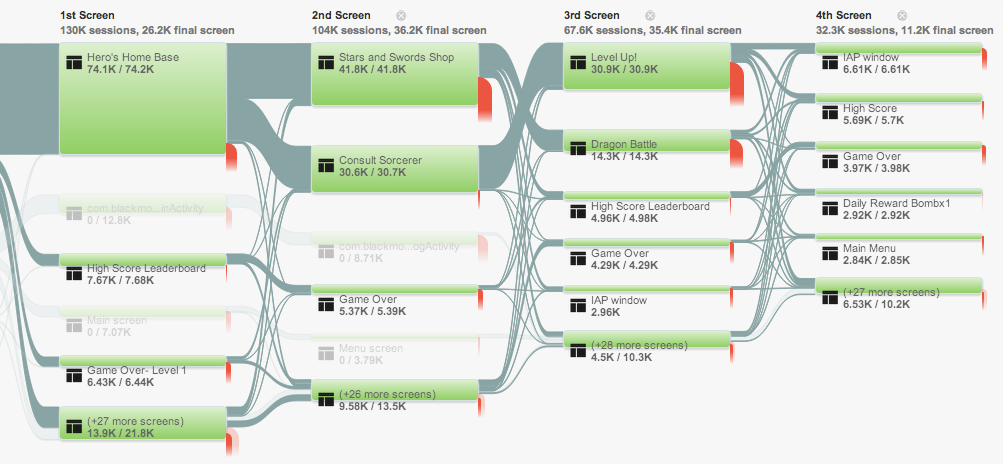
Users might have stopped using your app because of design flaws. Behavior Flow report, a type of report within Google Analytics, can help you identify sticking points and take targeted action.
The Behavior Flow report measures the various screens or events that users visit within your app and provides you with the percentage of people who go on to engage other screens or drop off altogether. This makes clear:
What screens users are seeing
Which ones are most popular
How long users stay on each screen
How they navigate from one screen to the next
This information can help you in a number of ways. For example, if you had a game app and each of your game’s levels used a different screen, you could track what percentage of people pass through each level. If there’s a level that has massive user drop-off, that may indicate that the level is too hard. Further, you may find that the exit rate on the “Game Over” screen is particularly high. This could mean that the image or text isn’t incentivizing users to play the game again. You can learn more about this report in the “Know your Flows” section
here
.
Finding Technical Flaws: Crash and Exceptions Report
Aside from design flaws, technical flaws could be causing your users to give up on your app. This where the
Crashes and Exceptions reports
comes in handy. In this report, data can be broken out by app version, operating system, and device brand, so you can evaluate your app’s technical performance in different environments. To take it one step further, you may want to consider how much crashes are costing you. You can do this by creating two segments: one for sessions with crashes and another without. Then compare the eCommerce conversion rate and average order value of the segments to see if these metrics are lower in sessions with a crash. More information about Crashes and Exceptions can be found
here
.
A metrics-driven approach can help you prioritize your team’s next steps. With our integration of Google Analytics for mobile apps in AdMob, we are making it easier to discover trends and take action that will tie directly to your most important goals. Visit our
website
to learn more about how AdMob can help you understand your users. Until next time, be sure to stay connected on all things AdMob by following our
Google+
page.
Posted by Sarah Xie
Mobile Strategic Partner Manager
AdMob App Spotlight Video Series: Freaking Math
March 11, 2015
Vietnamese developer, Bang Nguyen, built the addictive math game, Freaking Math while he was still at Vietnam's University of IT. Passionate about games and building a global audience, Bang wanted a way to easily monetize his app while keeping it free for users. Taking full advantage of our global advertising inventory and the variety of ad formats available, he found a successful solution with the AdMob platform. Watch us dive deeply into Bang’s app, highlighting the things he does especially well, like how he visually onboards new users, intelligently placed ads, and uses competition to make his app more engaging. Stay tuned for more App Spotlight videos by subscribing to our
YouTube channel
and following us on
Google+
.
Posted by Raj Ajrawat,
Product Specialist
How do you find your most active users and keep them engaged?
March 4, 2015
Lowdown is a weekly series that brings you tips and tricks on how to best use AdMob to grow your app business, directly from members of the Google AdMob team.
Paul Buchheit, the Googler behind Gmail and now partner at Y Combinator, is famous for emphasizing that, “It’s better to make something a small number of people love, than something a large number of people don’t care about.” This is absolutely true for your app business. Scaling something mediocre isn’t going to fare well for your business in the long run. Its crucial not to settle for exclusively measuring fluffy metrics like overall downloads or general traffic. You’ve got to dig deeper to find out who’s using your app the most, what they love about it, and eventually double down on what’s working well. We’d like to introduce you to two key reports from Google Mobile App Analytics that will help you to do just that.
Loyalty Report within Google Analytics
The Loyalty Report within Google Analytics shows you the number of sessions for the nth occurrence in your app. You’ll see the number of “1st interactions” with your app, then the number of “2nd interactions”, then the number of “3rd interactions”, and so on.
This report can help you determine at what point in your app users drop off. For example, your Loyalty Report may show you that users with fewer than three sessions have lower conversion rates.
With this information, there are many tests that you can run. You could go through the app yourself to see if there’s anything within the user experience that hinders engagement past 3 sessions. You could segment the users that drop off before 3 sessions and investigate whether they share any common attributes–maybe they came from a marketing campaign that’s bringing in the wrong audience or there could be a language difference. You could even try to use advertising to motivate users early with incentives.
By clearly recognizing the engagement drop off point in your app, you can begin to take methodical action towards increasing engagement. Check out the help desk for more
detailed information
.
Recency Report within Google Analytics
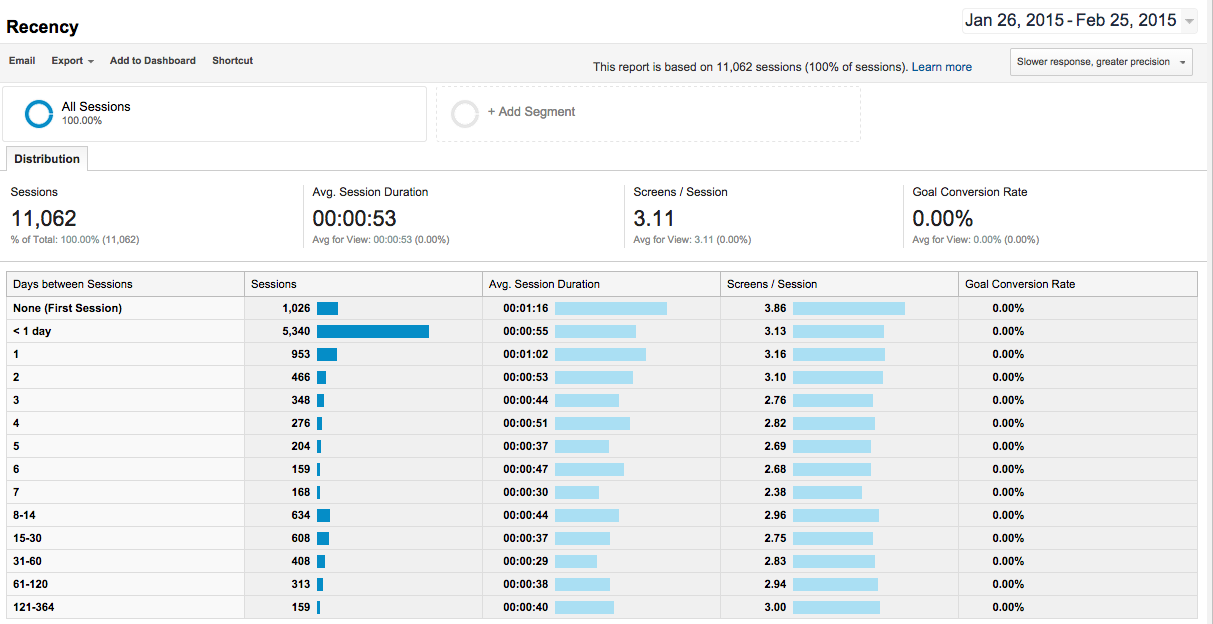
The Recency Report within Google Analytics shows how much time passed between app sessions. This provides a great way to segment users based on frequency of engagement, and enables you to know who uses your app once a month, or once a week, or even once a day. With this information you can begin to target new customers that are similar to your most engaged segment. You could also try using
notifications
or
advertising
to bring less engaged users back more frequently.
It's critical for your app's growth to have a disciplined and metrics driven approach to understand who uses your app. AdMob has Google Mobile App Analytics built right in, making it easier to discover trends and take action that will directly tie to revenue. Visit our
website
to learn more about how AdMob can help you understand your users. Until next time, be sure to stay connected on all things AdMob by following our
Google+
page.
Posted by Sarah Xie
Mobile Strategic Partner Manager
Why we try, buy and say goodbye to mobile games
March 3, 2015
Today, everyone is a gamer. With smartphones as a constant companion, consumers have easy access to all kinds of mobile apps – and they love to play games. From puzzles, casino, arcade and adventure games, they play whenever they have a free moment. According to
AppFigures
, in 2014, games was the fastest-growing category in the Google Play Store.
As a developer, understanding why people choose to interact with certain games is the key to success. Understanding this behavior can be the difference between a hit game or a download dud. Let’s take a look at some of the latest industry trends we’re seeing.
How users discover new apps
According to a recent survey with Google/Ipsos, Consumer Mobile Apps Study in 2014,
27% of smartphone app users
rely on search engines to find a new app. Search advertising is a key way for you to get your apps discovered and grow your audience.
Why users download games
There are various reasons why someone might download a new game. But according to the same survey,
60% of gaming app users
downloaded a gaming app simply because it sounded interesting and fun. Engaging app listings and positive reviews will help you capture their attention.
Why users try games
Consumers love getting things for free. We found that
67% of gaming app users
prefer free games supported by ads, rather than paying to download the app. They also love their snack-sized entertainment, with
78%
playing games simply to kill time.
Why users stop playing
On the flip side,
61%
of game app users say that the reason they quit an app is because they’ve lost interest in it, with
58%
of game app users going so far as to uninstall the app after it fails to hold their attention.
Use analytics to help you understand the consumer’s experience in your app – are they experiencing crashes, getting stuck at a certain level, or is something interrupting the flow of the game – so you can give them a better experience and keep them coming back.
We’ve compiled these stats and insights in this easy-to-share infographic below. Also, you can visit
www.google.com/admob
to learn more about our integration with Google Analytics in AdMob to monetize intelligently.
Posted by Desiree Motamedi
Product Marketing, AdMob
Research Methodology - Google/Ipsos, Consumer Mobile Apps Study, 2014
Google partnered with Ipsos MediaCT on the Mobile Apps Consumer Research to uncover consumer smartphone app acquisition and usage behaviors. Online survey was conducted Sep. 12-22, 2014 among 8,470 smartphone users aged 18-64 who have used any smartphone apps in the past 7 days and have used Entertainment, Finance, Gaming, Local, Retail, Social, Tech, or Travel apps in the past 30 days.
New AdMob features to help you monetize your app the smart way
March 2, 2015
Today, at the
Game Developers Conference
(GDC), we’re announcing three important updates to AdMob that will help developers build a smart monetization experience, and to help marketers reach the right users. We believe the best kind of in-app monetization experiences are the ones customized to individual app users, not a one-size-fits-all approach. Our vision for AdMob is to build a smart platform that makes such a tailored approach possible, or as we like to say, one that’s ‘audience aware’.
AdMob In-App Purchase House Ads
are a free, new format that can completely change how you think about your in-app purchase monetization strategy. You can use this format to create a customized ad to promote items to sell to your users, then AdMob’s audience-aware platform will predict those users who are likely to buy, and show them the ad. For all your other users - the ones unlikely to spend - AdMob can show them a regular ad. This approach means you can keep your high-value users engaged in your app, and for everyone else you’re making each impression count towards monetization. Currently in beta, this feature will be coming to all AdMob accounts in the next few weeks.
Audience Builder
is a powerful tool in AdMob that enables you to create lists of audiences based on how people use your app and then create customized experiences for users, ultimately growing your app revenue. For example, you could create an Audience List that defines those users who have not used your app in 14 days. Import that list into Google AdWords, and you can show ads to this list to re-engage users while they’re in other apps, or across the web. Audience Builder is available in all AdMob accounts now, and you can find out how to get started
here
.
AdMob Native Ads
are now in limited beta
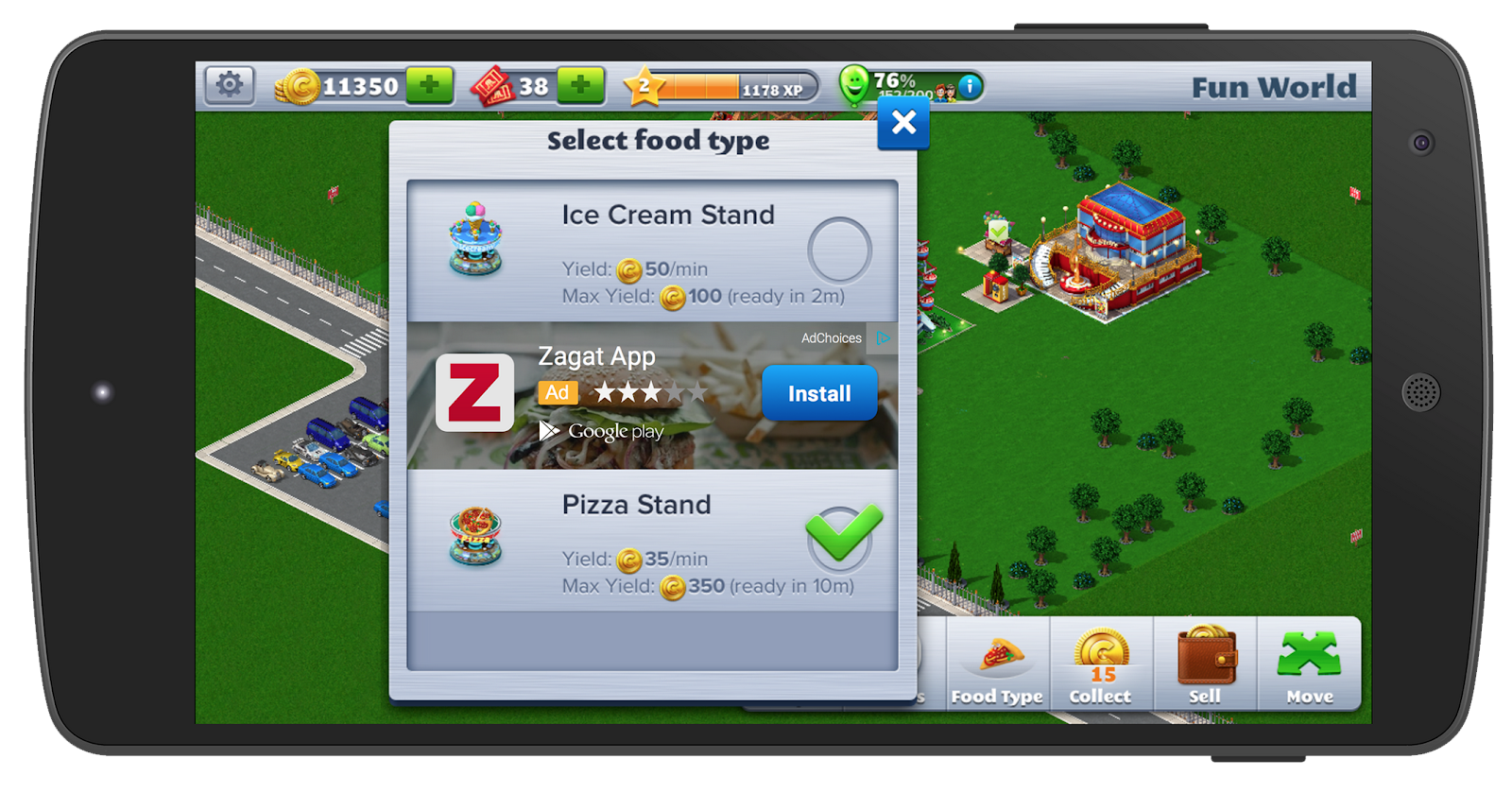
on the AdMob platform. Participating developers will be able to show native ads in their app from Google advertisers, and customize them to match both the form and function of their app. We pay close attention to user experience, so our native ads are designed to be clearly identifiable as ads to users. We’re thrilled to be working closely with Atari to bring native ads to RollerCoaster Tycoon® 4 Mobile; check out the screenshot below with an app install ad for Zagat:
The user-friendly focus of native ads was an important consideration for Atari’s Chief Operating Officer, Todd Shallbetter: ‘Atari creates great game experiences for our broad audience. We're happy to be partnering with Google and be the first games company to take part in the native ads beta and help monetize games in a way that enhances our users' experience.'
We’re testing native ads on non-gaming apps, too, partnering with developers globally, including CocoPPa in Japan.
These new features in AdMob can provide you with many new ways to supercharge your monetization. You can find out more about them on the
AdMob website
.
If you’re going to be at GDC, don’t miss my talk on Thursday, ‘Smart Strategies to Acquire, Retain and Monetize Gamers,’ where I’ll be discussing these new features. And if you can’t attend, check out our live sharing on
Google+
and
Twitter
to stay in the loop with what’s happening with #MeetAdMob.
Posted by Jonathan Alferness
Director of Product Management and Global Lead
for Mobile Display Ads and AdMob
#MeetAdMob at MWC and GDC Next Week
February 25, 2015
Are you prepared for the huge mobile development conferences happening around the world next week? The Google AdMob team is excited to attend both the Mobile World Congress in Barcelona and Game Developer’s Conference in San Francisco. If you’re attending either event, be sure to visit our booth. We’d love to hear about your app and share ways that you could supercharge monetization with AdMob.
At
Mobile World Congress
, we’ll be at the Google booth with our colleagues from the Cloud Platform and Adwords teams, other great services that can help you build and grow your app. There’ll also be several exciting Google talks including a keynote from Senior Vice President, for Android, Chrome & Apps, Sundar Pichai, and a panel discussion with Senior Director for YouTube, Stephen Nuttall.
At the
Game Developers Conference
, we’ll be at the Google booth with Project Tango, Niantic Project, Cardboard, Analytics, AdWords and Cloud Platform. There will be tons of interactive demos and on-site consultations that you won’t want to miss.
We’ll also be hosting a session at GDC called Smart Strategies to Acquire, Monetize and Retain Gamers. This talk will be by Director of Product Management for Mobile Ads, Jonathan Alferness, and Google’s Lead Product Manager for Google Analytics and Mobile Apps, Russell Ketchum. See all the details about our Google Developer Day
here
and check out all the other Google talks on the
GDC scheduler
.
If you can’t attend either event this year, we’ll be live tweeting and sharing on
Google+
and
Twitter
, so stay in the loop with what’s happening with #MeetAdMob. Also, you can still check out our morning talks from GDC on our livestream at
g.co/dev/gdc-livestream
.
Posted by the Google AdMob Team
We'll see you at GDC 2015!
February 24, 2015
The Game Developers Conference (GDC) is less than one week away in San Francisco. This year Google will host our annual
Developer Day
at West Hall and be on the Expo floor in booth #502. We’re excited to give you a glimpse into how we are helping mobile game developers build successful businesses and improve user experiences.
Our
Developer Day
will take place in Room 2006 of the West Hall of Moscone Center on Monday, March 2. We're keeping the content action-oriented with a few presentations and lightning talks, followed by a full afternoon of hands on hacking with Google engineers. Here’s a look at the schedule:
Opening Keynote || 10AM:
We’ll kick off the day by sharing to make your games more successful with Google. You’ll hear about new platforms, new tools to make development easier, and ways to measure your mobile games and monetize them.
Running A Successful Games Business with Google || 10:30AM:
Next we’ll hear from Bob Meese, the Global Head of Games Business Development from Google Play, who’ll offer some key pointers on how to make sure you're best taking advantage of unique tools on Google Play to grow your business effectively.
Lightning Talks || 11:15AM:
Ready to absorb all the opportunities Google has to offer your game business? These quick, 5-minute talks will cover everything from FlatBuffers to Google Cast to data interpolation. To keep us on track, a gong may be involved.
Code Labs || 1:30PM:
After lunch, we’ll turn the room into a classroom setting where you can participate in a number of self-guided code labs focused on leveraging Analytics, Google Play game services, Firebase and VR with Cardboard. These Code Labs are completely self-paced and will be available throughout the afternoon. If you want admission to the code labs earlier, sign up for Priority Access
here
!
Also, be sure to check out the Google booth on the Expo floor to get hands on experiences with
Project Tango
,
Niantic Labs
and
Cardboard
starting on Wednesday, March 4. Teams from AdWords, Analytics, Cloud Platform, Firebase and AdMob will also be available to answer any of your product questions.
For more information on our presence at GDC, including a full list of our talks and speaker details, please visit
g.co/dev/gdc2015
. Please note that these events are part of the official Game Developer's Conference, so you will need a pass to attend. If you can't attend GDC in person, you can still check out our morning talks on our livestream at
g.co/dev/gdc-livestream
. We’ll also be live
tweeting
and sharing on
Google+
, so stay in the loop with what’s happening with #MeetAdMob.
Posted by the Google AdMob Team.
Lowdown: How to Optimize Mediation for your App Part 2
February 21, 2015
Lowdown is a weekly series that brings you tips and tricks on how to best use AdMob to grow your app business, directly from members of the Google AdMob team.
Optimizing your mediation setup will help you get the highest CPMs from the ad placements in your app. Last week, I covered how to use dynamic, real time competition (the Live CPM feature) to increase your chances of higher CPMs. If you haven’t done so, make sure to
read through that article
for a clear explanation of what mediation is and how to enable Live CPM. This week I’ll go over two more strategies that will further enhance your competitive setup.
Regularly Update Your CPM Assignments
Make sure to update the CPM you assign for each of the ad networks in your mediation stack once every 10-14 days. Advertising network CPMs fluctuate over time. You want to be certain that the CPM you assigned for each network isn’t inaccurately high, causing you to settle for lower CPMs. Also, plan for your 10-14 day cycles to land on the first of every month, when advertiser’s usually reset their budgets.
Segment Your Assigned CPM Values
To further intensify competition, segment your assigned CPM values based on geography. Impressions from different geographic locations can differ in value. Many developers will calculate a unique value for their most profitable regions and do a separate calculation for their Rest of World (ROW) inventory.
To better understand how to segment by geography and increase the accuracy of your competitive setup, let’s use a real world app example. Imagine you’ve developed an app that’s very popular in Japan and in the US. When analyzing your mediation stack, it might be interesting to segment Japan and the US from the rest of the world and calculate the average CPM for each bucket. After doing so, you realized that one of your 3rd party advertising networks delivers $2 CPMs on average, but US and Japanese CPMs average $2.50 while the Rest of World CPM is $1.50. Instead of using the world average of $2.00, where AdMob would only need to beat $2.00 to serve a US and Japan impression, AdMob must now beat $2.50 to serve. Segmentation by geography brought precision to your competition, yielding potentially higher earnings.
For more detailed instruction on mediation in AdMob, be sure to visit our
Help Center
. In the next edition of Lowdown, we’ll be looking at how you can begin to calculate the value of each user using Google Analytics. Until next time, be sure to stay connected on all things AdMob by following our
Google+
page.
Posted by Adam Wolf
AdMob Account Strategist
Introducing AdMob App Spotlight Video Series
February 18, 2015
Want to make smarter choices to improve your app’s user experience and grow your business? Learn from successful app developers by taking a look at the decisions they’ve made in their apps in our new App Spotlight Video Series. This series offers in-depth walkthroughs of great apps, highlighting practical tips and tricks. Our first video features PicsArt, a photo sharing app that’s recently reported over 200M downloads. Stay tuned for more App Spotlight videos by subscribing to our
YouTube channel
and following us on
Google+
.
Posted by the Google AdMob Team
Lowdown: How to Optimize Mediation for your App Part 1
February 14, 2015
Lowdown is a weekly series that brings you tips and tricks on how to best use AdMob to grow your app business, directly from members of the Google AdMob team.
A key goal for many app developers is to maximize revenue. If you monetize with multiple ad networks, you'll know that some have fluctuating CPMs and fill rates. AdMob mediation can help you determine the most valuable ad to serve in your app, and AdMob can help you determine which ads to serve.
Today, we’re going to dive deeper into how our mediation platform works and introduce an optimization strategy that may increase your app’s revenue–enabling a feature called
Live CPM
. The best way to understand this feature is to first understand how basic mediation works.
Mediation
AdMob is a robust mobile ads platform that includes mediation–allowing you to serve ad impressions from multiple 3rd party networks, your own house ads, and Google’s advertising inventory. With basic mediation, you’re required to rank all of the ad networks you use, assigning a predicted CPM for each one. When it’s time to serve an ad, the mediation platform will first make a request to the network you’ve ranked as number 1. If that network doesn’t serve an ad, it will make a request to your second-ranked network. It will continue down your list until an ad is served. Although helpful, this setup is unsophisticated. It doesn’t matter if network 2 or 3 is able to pay you a higher CPM, you’ve already committed yourself to the fixed ranking, and there’s a better way to increase revenue.
Mediation with Live CPM
In contrast, when the Live CPM feature is enabled, you increase your chances of higher CPMs with real time, dynamic competition. When it’s time to serve an ad in your app, Google’s advertising demand will provide its most valuable CPM, and compare this to the CPM you’ve assigned for your first-ranked network. Whichever network has a higher CPM will get the impression.
If your first-ranked network wins, but is unable to fill the impression, the process will repeat with the next-ranked network in your chain. This all happens in real time.
When enabling Live CPM, the initial results can be startling. Without it, you’re much more likely to miss your next network’s top tier demand. With it, your set-up is dynamic and top tier impressions from both AdMob and your other networks can be served. If you’d like to learn more, check out our
case study
on how Thapster, a smartphone music game app, succeeded with Live CPM and visit our
Help Center
to get more in-depth instructions on how to implement it.
In the next edition of Lowdown we’ll be looking at how you can further optimize Live CPM. Be sure to stay connected on all things AdMob by following our
Google+
page.
Posted by Adam Wolf
AdMob Account Strategist
Translate
Labels
#AdMobGameStars
#io17
#TheNativeWay
#TheRewardedWay
A/B Testing
Accidental Clicks
Account Suspensions
Active View
Ad Network Optimization
AdMob
AdMob Mediation
AdMob Native Ads Express
admob_mediation
Ads Status Dashboard
AdWords
android
App Advertising
App Best Practices
app growth
App Growth Strategy
App Monetization
App Monetization Insights
app optimization
App Store Listing
Archiving Ad Units
Asia
Audience Builder
Balloon Island
Black Friday
Brazil
C++
cas
Casual Connect
Chamois
Cheetah Mobile
Cocos2d-x
Communication Preferences
Contact Details
Daydream
Developer Policy Center
developers
DoubleClick
Duolingo
Events
Feedback
Firebase
Firebase Analytics
Game Developers Conference
Game Development
Games
GDC17
Going Global
Google
Google Analytics
Google Analytics For Firebase
Google Assistant
Google I/O 2017
Google Marketing Next
Google Mobile Ads Lite SDK
Google Payments
Google Play
Google Startup Launch
GoogleDeveloperDay
GooglePlay
Help Centre
Holaverse
House Ads
I/O 2016
I/O 2017
In-App Purchase
India
Interactive Interstitials
interstitial ads
Interstitials
Invalid Traffic
iOS
Japanese
Joycity
Linghit Limited
Material Design
mediation
Mediation Adapters
Mobile
Mobile Ads Garage
Mobile Ads SDK
Mobile App Development
Mobile App Development Tips
mobile_ads_sdk
Mohan Noone
Monetization Strategy
Native
Native Ads
Native Ads Express
Open Bidding
Pink Pointer
Policy
Portrait Video
Potentially Harmful Applications
Product Announcement
Rewarded Ads
Rewarded Video Ads
Security
SEGA
SmartApps
Sohomob
Sonic The Hedgehog
Spanish
Splash Pages
Sport
Student App Challenge
Success Stories
Survey
Suspensions
Testing
The No-nonsense Guide to In-App Ads
The No-Nonsense Guide to Native Ads
Trial Run Ads
UAC
United States
Unity
Universal App Campaigns
User Acquisition
user engagement
User Experience
UX
viewability
VR
Zen of Monetization
Archive
2018
Sep
Jul
May
Mar
Feb
Jan
2017
Oct
Jun
May
Apr
Mar
Feb
Jan
2016
Dec
Nov
Oct
Sep
Aug
Jul
Jun
May
Apr
Mar
Feb
Jan
2015
Dec
Nov
Oct
Sep
Aug
Jul
Jun
May
Apr
Mar
Feb
Jan
2014
Dec
Nov
Oct
Feed
Useful links
Sign up for news and insights from AdMob
Google Ads Developer Blog
Sign in to your AdMob account
Sign up to monetize your website with AdSense
Google
on
Follow @admob